Sign Up at Prime Casino Official and Claim Your Personalised Welcome Offer

Creating an account at Prime Casino takes under five minutes. Once registered, you unlock access to 7,000+ games, a choice of welcome offers, and the My Levels loyalty programme. This guide covers every step: the registration form, verification, bonus codes, security settings, and what to do if something goes wrong.

£10 deposit · welcome bonus
Registerwith bonus
Why Register at Prime Casino

A Prime Casino account is your entry point to the full platform - slots, live tables, jackpots, and promotions are all gated behind login. Without an account you can browse the lobby in demo mode for some titles, but real-money play, withdrawals, and bonuses require a verified profile.

Registration also activates your welcome offer. Prime Casino runs several first-deposit schemes simultaneously, so the moment you sign up you can choose between a match bonus, free spins packages, or the year-long weekly spins deal. The earlier you register, the sooner you can pick the option that suits your style.

The platform operates under UKGC licence number 039326-R-319358-054, held by Skill On Net Ltd. That means every account is protected by UK consumer law, and your funds sit in segregated accounts under the 'Medium Protection' scheme - separate from the company's operating capital.

Where to Find the Registration Button

On desktop, the 'Join' or 'Register' button sits in the top-right corner of every page. On mobile browser, the same button appears in the header menu. Inside the iOS or Android app, you will see the button on the welcome screen before login. Tapping it opens the account-creation form directly - no detours.

If you already have an account under a different email within the SkillOnNet network (Playmillion, Lucky Louis, Spingenie, Luna), a second registration under a new email is not permitted. The platform checks device and payment fingerprints across all SkillOnNet brands.

Register Now

Registration Requirements

Before you start filling in the form, confirm you meet these conditions:

  • Age: 18 or over (mandatory; the platform verifies this automatically and via KYC)
  • Residency: UK residents use the GBP account; accounts are available for other supported regions too
  • One account per person: one email address, one phone number, one payment method per player
  • No existing account in the SkillOnNet network under the same identity

You will need a valid email address and a UK mobile number to complete the process.

How to Create Your Account

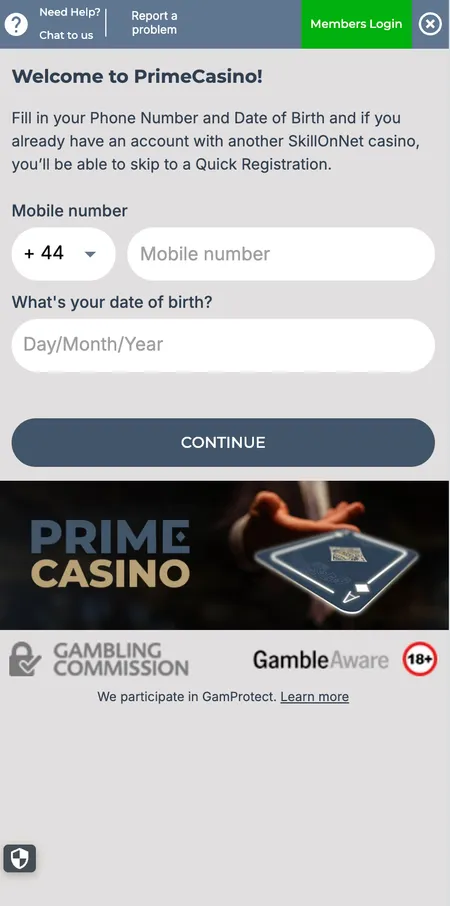
  1. Prime Casino registration form first step

    Step 1 - Open the form. Click 'Join' in the top-right corner on desktop or the equivalent button in the app. The first screen asks for your first name, last name, gender, and date of birth.

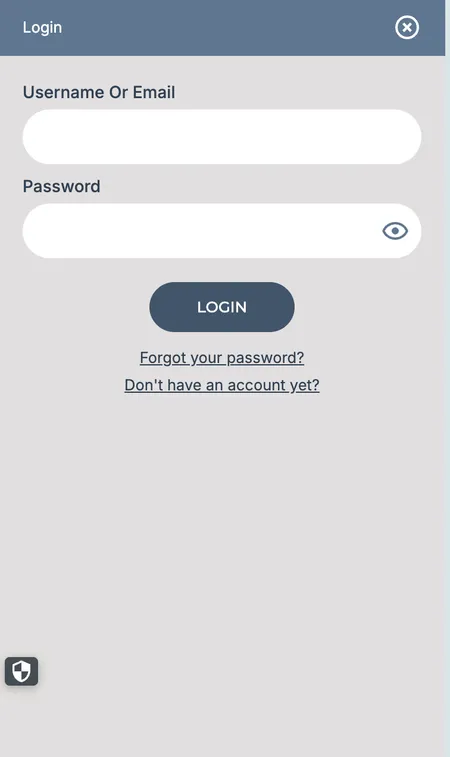
  2. Prime Casino login screen after successful registration

    Step 2 - Add contact details. Enter your email address, mobile phone number, and residential address. These details are used for KYC and withdrawal verification, so accuracy matters. Choose a strong password (mix of letters, numbers, and symbols).

Completing the Form

The registration form at Prime Casino is split into logical sections:

  • Personal info: first name, last name, date of birth, gender
  • Contact: email, phone number
  • Address: full UK address including postcode
  • Password: choose a unique password not used on other sites
  • Promotional code: if you have a bonus code (PrimeBB, BM155WC, PC365, GC25), enter it here before submitting - you cannot apply most codes retroactively
  • Terms agreement: tick the box to confirm you are 18+ and accept the Terms and Conditions

After submission, an email arrives with a confirmation link. Click it to activate your account. The link expires after a short window, so check your inbox promptly (and spam folder if it does not appear).

Prime Casino sends a confirmation email immediately after form submission. Activation is instant once you click the link. If the email does not arrive within five minutes, check your spam folder or contact support via the contacts page.

Registration on Different Devices

The process is identical whether you register on desktop (Chrome, Firefox, Safari), mobile browser, or the dedicated app.

Device Method Notes
Desktop Browser Full form, easiest to type long details
Mobile browser Safari or Chrome Same form, optimised layout
iOS app (9.0+) App Store download Native interface, Touch ID login after setup
Android app (4.4+) Google Play download Push notifications for bonus alerts

HTML5 build means no plugins needed anywhere. The Prime Casino app offers the same registration flow as the website, with the added benefit of Face ID or fingerprint login from your first session onwards.

Create Account

First Login and Profile Setup

After email confirmation, log in with your email and password. The dashboard opens immediately. Priority actions on first login:

  1. Go to 'My Documents' and upload KYC documents if prompted (speeds up your first withdrawal)
  2. Check 'My Levels' to see your starting point in the loyalty programme
  3. Visit 'Responsible Gaming' to set daily, weekly, or monthly deposit limits
  4. Enable two-factor authentication (2FA) for extra security

Your account level never drops once reached - even if you take a break from playing.

KYC Verification After Registration

Prime Casino uses automatic data checks first. If the system cannot verify your identity from the details you provided, a manual KYC request is triggered. Documents accepted:

  • Photo ID: passport or UK driving licence
  • Proof of address: utility bill, bank statement, or council letter - dated within 3 months
  • Source of funds: required for larger cumulative deposits

Documents go into the 'My Documents' section of your profile. Verification takes 12-24 hours. From February 2025, players with cumulative deposits over £125 may face an affordability check under the UKGC White Paper requirements - this is a regulatory step, not a penalty.

The first withdrawal will not process until KYC is complete, so uploading documents early is strongly recommended.

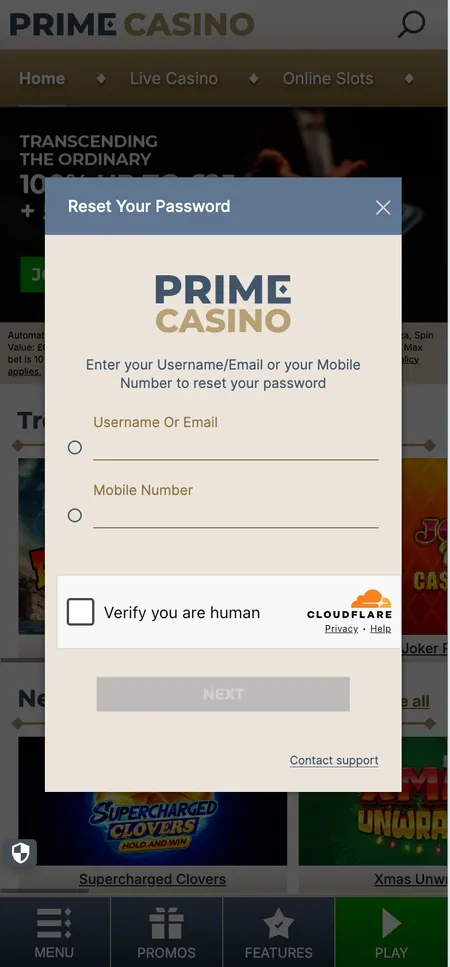
Prime Casino password reset screen

If you forget your password, use 'Forgot Password?' on the login page. Enter your registered email and follow the reset link sent to your inbox.

Password, Security and 2FA

Prime Casino protects connections with TLS/SSL encryption and supports two-factor authentication. To set up 2FA, go to account settings after login. For a strong password:

  • Minimum 8 characters
  • At least one uppercase letter, one number, one symbol
  • Never reuse a password from another site

If you forget your password, use the 'Forgot Password?' link on the login page. A reset link arrives by email. No personal data is shared with third parties; all data is protected by SSL and a firewall.

Prime Casino does not permit credit card deposits under UKGC rules. Only debit cards (Visa, Mastercard), PayPal, Trustly, and Apple Pay are accepted for UK accounts. Paysafecard, Skrill, and SOFORT are not available for UK players.

Bonus Codes at Registration

Entering a prime casino bonus code during sign-up changes your welcome package. Here is a quick comparison of the current options:

Bonus Code Offer Min Deposit
No code 100% match up to £25 + spins on Big Bass Bonanza £10
PrimeBB 151 free spins on Big Bass Splash £10
BM155WC 155 free spins on Football Cash Collect £10
PC365 520 spins over 52 weeks + 50% match up to £25 £50
GC25 Golden Chips for Playtech Live tables £10

All welcome offers share the same core conditions: 10x wagering on bonus and free spin winnings, maximum stake of 10% of bonus or £5 (whichever is lower), and a 30-day completion window. Each new player picks exactly one offer - they are mutually exclusive, and there is a 72-hour cooldown between bonuses across the SkillOnNet network.

For a detailed breakdown of every promotion, visit the Prime Casino bonuses page.

Ready to play? Open your Prime Casino account today and choose your welcome bonus before the first deposit.

Common Registration Problems

Problem Solution
Email already registered Use 'Forgot Password?' or contact support - you may already have an account
Confirmation email not arriving Check spam; wait 5 minutes; request resend from the login page
Phone number already in use One number per account; contact support if this is an error
Bonus code not accepted Code may be expired or entered incorrectly; apply before submitting the form
Page not loading Clear browser cache or switch to another browser; try mobile app
KYC document rejected Re-upload a clearer photo; ensure all four corners of the document are visible

For issues not resolved by the FAQ, live chat is available 06:00-00:00 GMT daily with an average agent response of 1-2 minutes. Reach support via the contacts section without logging in if your account is inaccessible.

Once your account is active, everything on Prime Casino, from 5,100+ slots to 370+ live games, is available with a single login.

FAQ: Prime Casino Registration

Can I register if I already have an account at another SkillOnNet casino?

No. Skill On Net Ltd operates Prime Casino alongside Playmillion, Lucky Louis, Luna, and Spingenie. One account is permitted per person across the entire network. Attempting to open a duplicate account breaches the Terms and Conditions.

Is there a minimum age to register?

Yes. You must be 18 or older. The platform runs automatic age verification at sign-up; if it fails, a manual KYC check is required before you can deposit or play for real money.

How long does registration take?

Filling in the form takes 2-3 minutes. Email confirmation is instant. If no KYC is triggered automatically, your account is ready to use immediately after clicking the activation link.

When should I enter a Prime Casino bonus code?

Enter your bonus code in the designated field before submitting the registration form. Most codes cannot be applied after your account is created or your first deposit is made.

What documents are needed for KYC?

A photo ID (passport or UK driving licence) and a proof of address dated within the last 3 months (utility bill, bank statement, or council letter). For higher deposit amounts, source of funds evidence may also be required.

Can I register and play on mobile?

Yes. The website is fully responsive, and dedicated apps are available for iOS (9.0 or higher) and Android (4.4 or higher) via the App Store and Google Play. The registration form and full game library are available on all devices.

What happens if my email confirmation link expires?

Return to the login page and look for a 'resend confirmation' option, or contact support via the contacts page. An agent can manually verify your email if needed.

Is two-factor authentication available?

Yes. After logging in for the first time, you can enable 2FA in your account security settings. This adds a one-time code step each time you log in, significantly reducing unauthorised access risk.

What is the 72-hour cooldown between bonuses?

If you claim a welcome bonus, you must wait 72 hours before claiming another promotion within the SkillOnNet network. This rule applies across all brands operated by Skill On Net Ltd.

Can I set deposit limits when I register?

Yes. Deposit limits (daily, weekly, monthly) can be set immediately in 'My Account' under 'Player Limitation'. Reducing a limit takes effect instantly; increasing one requires a cooling-off period as required by UKGC rules.